
Business Finance
Record income, expenses, and transfers
Use Workspace Admin → Business Finance → Record a transaction. The available types cover income, expense, receivable, payable, borrowing or credit, loan repayment, and account transfer. The form changes its fields according to the type you select.
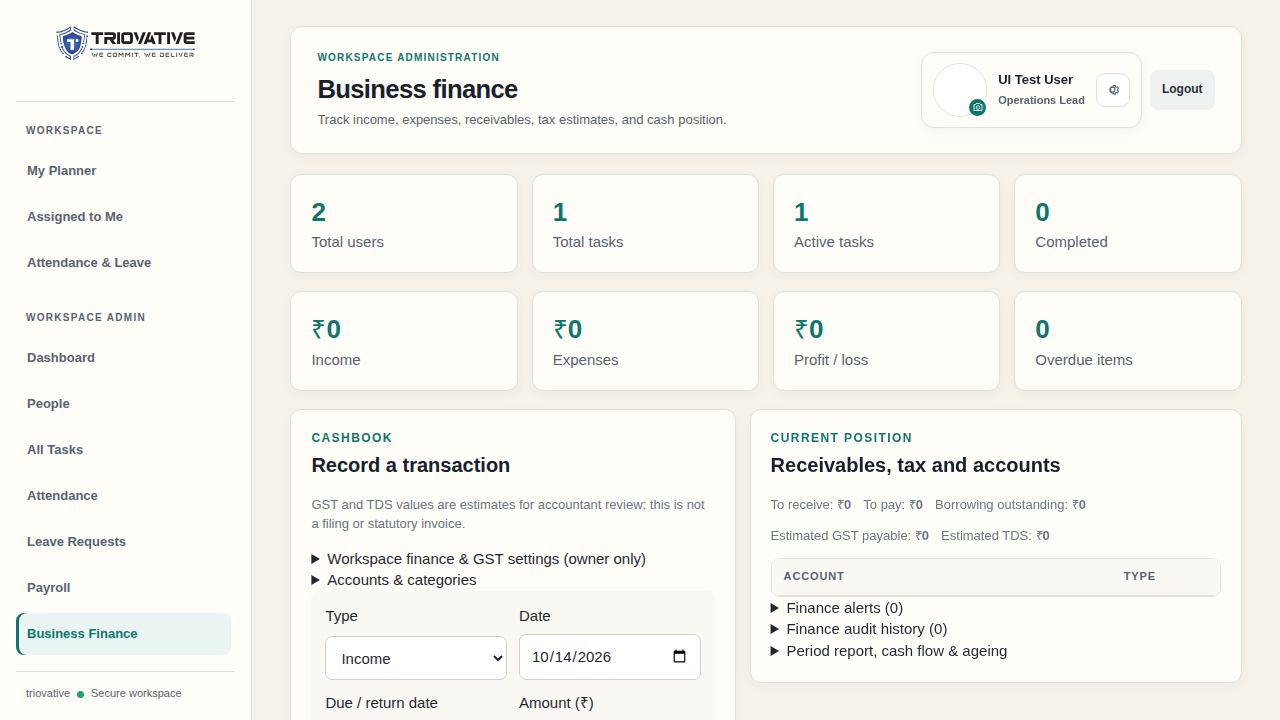
Example screen using sample data; totals and available controls depend on your workspace.
Record a cashbook entry
- Select the transaction type and date.
- Enter the amount, source account, and any destination account needed for a transfer.
- Choose an applicable category and party, and add a clear description or reference.
- Review any GST or TDS treatment displayed in the form, then save.
- Confirm the entry in Recent transactions. Use date, type, and status filters or download the filtered CSV export when needed.
A transfer moves value between two accounts and should not be described as new business income. Receivables, payables, and borrowings can be recorded before cash moves; use their settlement workflow for actual receipts or payments.
Do not silently edit a finalized entry. Where the correction action is allowed, the system creates a linked replacement and voids the original with audit evidence. A settled record is protected from automatic correction; review it with the workspace owner or accountant.